App
The app on your phone
Put Curaçao Cycling on your home screen so everything is one tap away. It works on every phone — the steps are below.
You don't need to download anything from the App Store or Google Play. You only create a shortcut to the site on your home screen.
Choose your phone
iPhone or iPad
Browser: Safari
- 1
Open www.curacaocycling.com in Safari.
- 2
Tap the share icon at the bottom of the screen: the square with the arrow pointing up.
- 3
Choose 'Add to Home Screen' and tap 'Add' at the top right.
Android phone
Browser: Chrome
- 1
Open www.curacaocycling.com in Chrome.
- 2
Tap the three dots at the top right.
- 3
Choose 'Install app' or 'Add to Home screen'.
 Curaçao Cycling
This is what it looks like
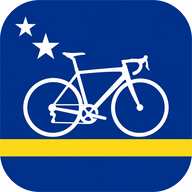
- Your own icon with the Curaçao flag on your home screen.
- The site opens like a real app, without a browser bar.
- Always the latest agenda, results and news.
Not working?
- On an iPhone it only works in Safari, not in Chrome or another browser.
- Don't see 'Install app'? Choose 'Add to Home screen' instead — it does exactly the same.
- Is the icon already there? Then it worked: tap it to open the site.